This is a very brief overview of features available in the mergeplg package for merging rainfall data from multiple sensors (CMLs, PWSs, SMLs) with gridded data such as radar. A more comprehensive overview can be found in the mergeplg documentation.
import matplotlib.pyplot as plt
import xarray as xr

import poligrain as plg
import mergeplg as mrgmrg.__version__'0.2.0'Load example data
We use a subset of the OpenMRG dataset (Andersson et al., 2022) which contains radar, CML and rain gauge data in Gothenburg, Sweden. poligrain provides a convenient loader for this dataset.
(
    ds_rad,
    ds_cmls,
    ds_gauges,
    ds_gauges_smhi,
) = plg.example_data.load_openmrg(data_dir="example_data", subset="8d")
File already exists at example_data/openmrg_cml_8d.nc
Not downloading!
File already exists at example_data/openmrg_rad_8d.nc
Not downloading!
File already exists at example_data/openmrg_municp_gauge_8d.nc
Not downloading!
File already exists at example_data/openmrg_smhi_gauge_8d.nc
Not downloading!
# UTM32N: https://epsg.io/32632
ref_str = "EPSG:32632"

ds_gauges.coords["x"], ds_gauges.coords["y"] = plg.spatial.project_point_coordinates(
    ds_gauges.lon, ds_gauges.lat, ref_str
)

ds_gauges_smhi.coords["x"], ds_gauges_smhi.coords["y"] = (
    plg.spatial.project_point_coordinates(
        ds_gauges_smhi.lon, ds_gauges_smhi.lat, ref_str
    )
)

# For CML
(
    ds_cmls.coords["site_0_x"],
    ds_cmls.coords["site_0_y"],
) = plg.spatial.project_point_coordinates(
    ds_cmls.site_0_lon, ds_cmls.site_0_lat, ref_str
)
(
    ds_cmls.coords["site_1_x"],
    ds_cmls.coords["site_1_y"],
) = plg.spatial.project_point_coordinates(
    ds_cmls.site_1_lon, ds_cmls.site_1_lat, ref_str
)

# Midpoint
ds_cmls.coords["x"] = (ds_cmls.site_0_x + ds_cmls.site_1_x) / 2
ds_cmls.coords["y"] = (ds_cmls.site_0_y + ds_cmls.site_1_y) / 2

# Projected radar coords
ds_rad.coords["x_grid"], ds_rad.coords["y_grid"] = (
    plg.spatial.project_point_coordinates(ds_rad.lon, ds_rad.lat, ref_str)
)
Adjust radar with CMLs
mergeplg provides different methods for merging radar with gauge and CML data. All methods provide a similar interface. Below we show and example using MergeDifferenceIDW which does additive radar adjustment using inverse distance weighting (IDW) for the interpolattion of the bias field calculated from the difference between gauges and/or CMLs and radar measurements.
First we resample the CML rain rates from 10 seconds to 5 minutes, which is the time interval of the radar data. Note that the CML data has already been with a simple standard proccedure, see this notebook in the OpenSense example data repository.
We also resample the 1-minute gauge rainfall amounts to 5-minute rain rates.
da_cmls_R_5min = ds_cmls.R.isel(sublink_id=0).resample(time="5min").mean()
da_gauges_R_5min = (ds_gauges.rainfall_amount.resample(time="5min").sum() * 12)
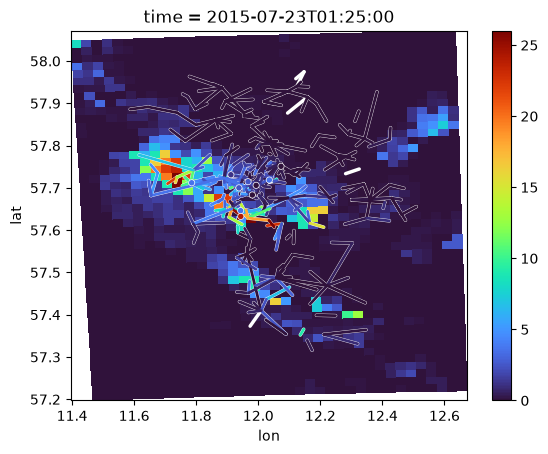
This is a quick look at the 5-minute radar, gauge and CML rainfall rates for a specific time step.
i_t = 305

vmin = 0
vmax = 26

t = ds_rad.time.isel(time=i_t)
plg.plot_map.plot_plg(
    da_grid=ds_rad.R.sel(time=t),
    da_gauges=da_gauges_R_5min.sel(time=t),
    da_cmls=da_cmls_R_5min.sel(time=t),
    vmin=vmin,
    vmax=vmax,
    cmap="turbo",
    kwargs_cmls_plot={"edge_color": "w"},
    kwargs_gauges_plot={"edge_color": "w"},
);
To do the radar adjustment we initialize the MergeDifferenceIDW object which precalculates the CML-grid-intersection weights and the nearest neighbor lookup used for interpolation. This merger object can the be called for each time step to calculate and return the adjusted radar field.
# IDW additive adjust
merger = mrg.merge.MergeDifferenceIDW(
    ds_rad=ds_rad.R, # here, only the grid coordinates are used for the radar
    ds_cmls=ds_cmls, # here, only the link coordinates are used for the CMLs
    method="additive",
    range_checks={"diff_check": 10},
    nnear=12,
)

rainfall = []
for time in ds_rad.time.data:
    rainfall.append(
        merger(
            da_rad=ds_rad.sel(time=time).R,
            da_cmls=da_cmls_R_5min.sel(time=time),
        ).rainfall
    )
ds_rad["rainfall_additiveIDW"] = xr.concat(rainfall, dim="time")
Here is an example of unadjusted vs. adjusted radar rainfall rates.
i_t = 305
fig, axs = plt.subplots(1, 3, figsize=(12, 4), sharex=True, sharey=True)
ds_rad.R.isel(time=i_t).plot(ax=axs[0], vmin=vmin, vmax=vmax, cmap="turbo")
ds_rad.rainfall_additiveIDW.isel(time=i_t).plot(ax=axs[1], vmin=vmin, vmax=vmax, cmap="turbo")
(ds_rad.R - ds_rad.rainfall_additiveIDW).isel(time=i_t).plot(ax=axs[2], vmin=-vmax/5, vmax=vmax/5, cmap="RdBu")

axs[0].set_title("Unadjusted Radar")
axs[1].set_title("Additive IDW Adjusted Radar")
axs[2].set_title("Difference (Unadjusted - Adjusted)");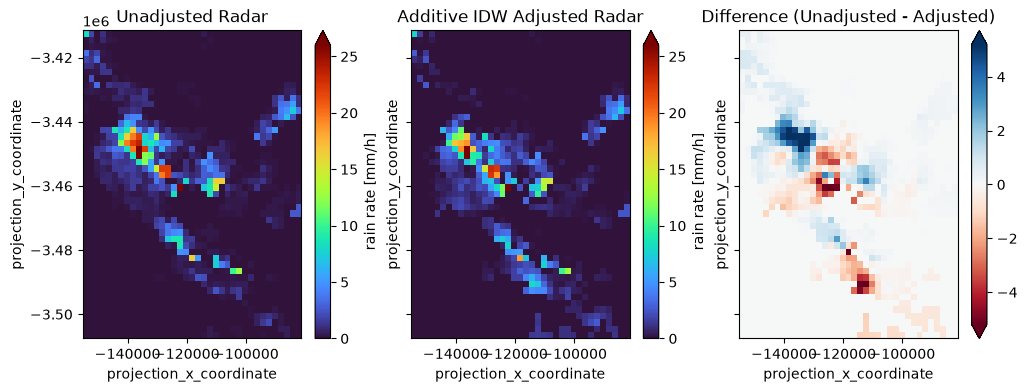
Compare adjusted fields to rain gauges
To do a quantitative comparison between the adjusted radar fields and the rain gauges, we extract the values of the radar grid at the gauge locations and then compare them to the actual gauge measurements.
We do this using poligrain’s GridAtPoints class. The same functionality is available for CMLs using the GridAtLines class. Both these classes are also used internally by the MergeDifferenceIDW class, and the other merging methods in mergeplg, to perform the radar adjustment.
get_grid_at_points = plg.spatial.GridAtPoints(
    da_gridded_data=ds_rad,
    da_point_data=ds_gauges,
    nnear=1,
    stat="best",
)

da_radar_at_gauge_unadjusted = get_grid_at_points(
    da_gridded_data=ds_rad["R"],
    da_point_data=ds_gauges.rainfall_amount,
)
da_radar_at_gauge_additiveIDW = get_grid_at_points(
    da_gridded_data=ds_rad.rainfall_additiveIDW,
    da_point_data=ds_gauges.rainfall_amount,
)
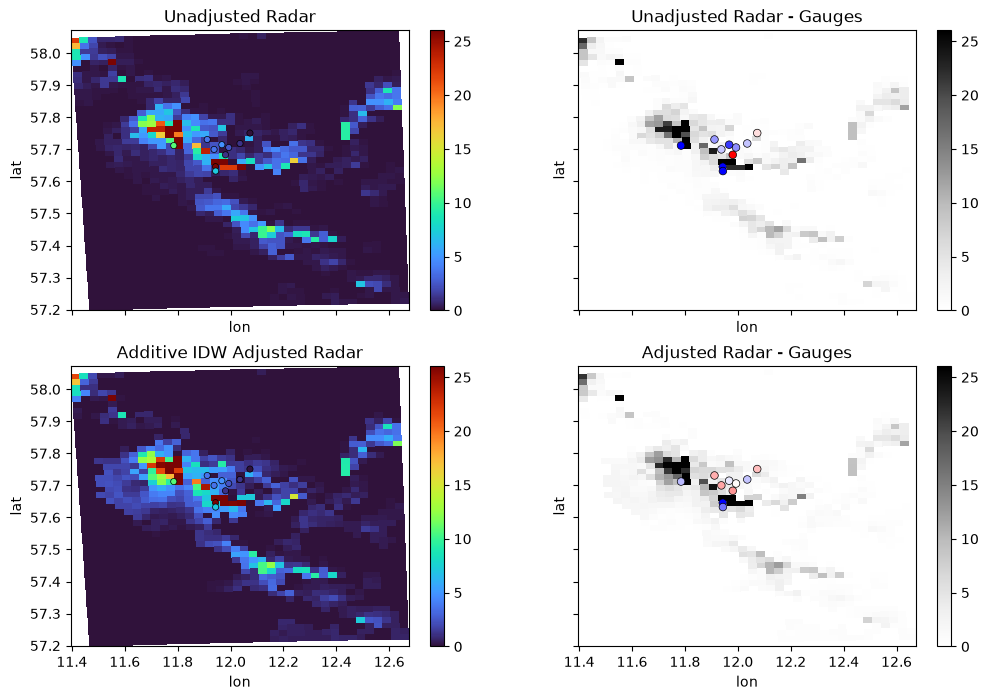
Now plot unadjusted and adjusted radar rainfall fields for a specific time step together with the difference at the gauges.
i_t = 306
t = ds_rad.time.isel(time=i_t)

vmin, vmax = 0, 26

fig, axs = plt.subplots(2, 2, figsize=(12, 8), sharex=True, sharey=True)

plg.plot_map.plot_plg(
    da_grid=ds_rad.R.sel(time=t),
    da_gauges=da_gauges_R_5min.sel(time=t),
    vmin=vmin,
    vmax=vmax,
    cmap="turbo",
    ax=axs[0, 0],
)
axs[0, 0].set_title("Unadjusted Radar")

plg.plot_map.plot_plg(
    da_grid=ds_rad.R.sel(time=t),
    da_gauges=(
        da_gauges_R_5min.sel(time=t)
        - da_radar_at_gauge_unadjusted.isel(time=i_t)
    ),
    vmin=vmin,
    vmax=vmax,
    cmap="Grays",
    ax=axs[0, 1],
    kwargs_gauges_plot={
        "s": 30,
        "cmap": "bwr_r",
        "vmin": -vmax/5,
        "vmax": vmax/5,
    },
)
axs[0, 1].set_title("Unadjusted Radar - Gauges")

plg.plot_map.plot_plg(
    da_grid=ds_rad.rainfall_additiveIDW.sel(time=t),
    da_gauges=da_gauges_R_5min.sel(time=t),
    vmin=vmin,
    vmax=vmax,
    cmap="turbo",
    ax=axs[1, 0],
)
axs[1, 0].set_title("Additive IDW Adjusted Radar")

plg.plot_map.plot_plg(
    da_grid=ds_rad.rainfall_additiveIDW.sel(time=t),
    da_gauges=(
        da_gauges_R_5min.sel(time=t)
        - da_radar_at_gauge_additiveIDW.sel(time=t)
    ),
    vmin=vmin,
    vmax=vmax,
    cmap="Grays",
    ax=axs[1, 1],
    kwargs_gauges_plot={
        "s": 30,
        "cmap": "bwr_r",
        "vmin": -vmax/5,
        "vmax": vmax/5,
    },
)
axs[1, 1].set_title("Adjusted Radar - Gauges");
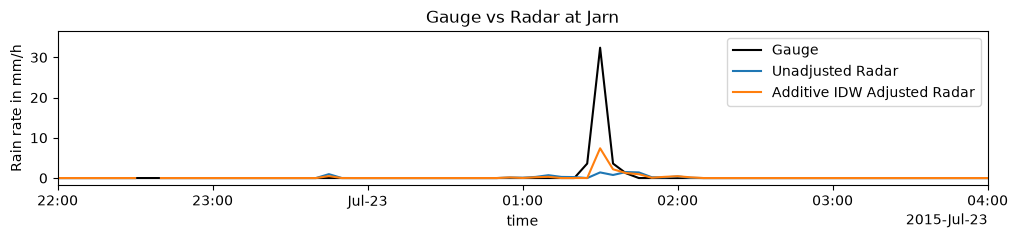
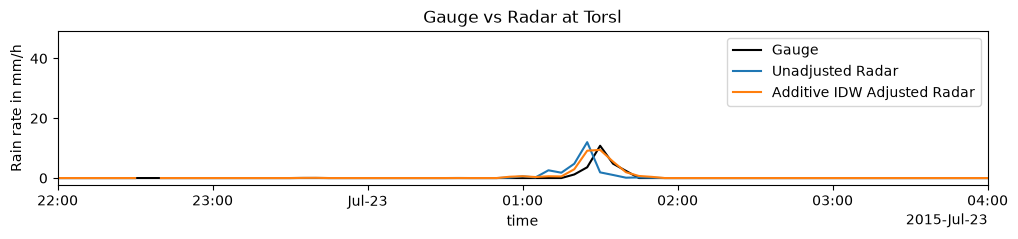
Let’s also plot the time series at two of the gauges for the period around the specific time step shown above.
for gauge_id in ['Jarn', 'Torsl']:
    da_gauges_R_5min.sel(id=gauge_id).plot.line(x='time', color='k', label='Gauge', figsize=(12, 2))
    da_radar_at_gauge_unadjusted.sel(id=gauge_id).plot.line(x='time', label='Unadjusted Radar')
    da_radar_at_gauge_additiveIDW.sel(id=gauge_id).plot.line(x='time', label='Additive IDW Adjusted Radar')
    plt.legend()
    plt.title(f'Gauge vs Radar at {gauge_id}')
    plt.ylabel('Rain rate in mm/h')

    plt.xlim(
        da_gauges_R_5min.time.sel(time='2015-07-22 22:00:00'),
        da_gauges_R_5min.time.sel(time='2015-07-23 4:00:00'),
    );
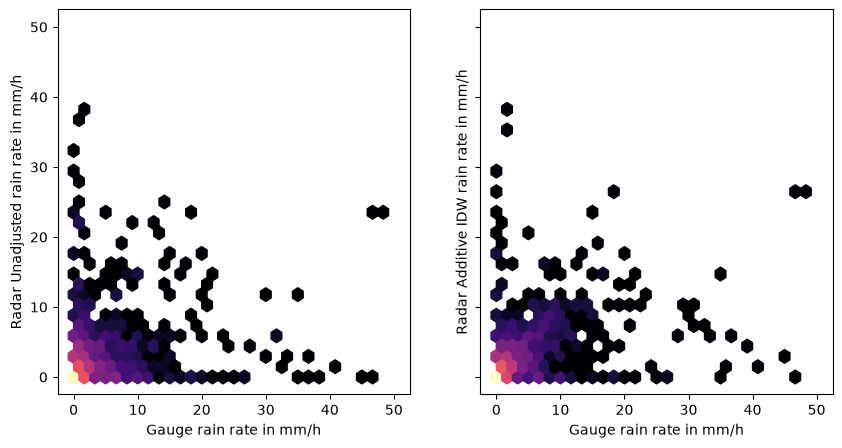
Finally, plot all data for unadjusted and adjusted radar rainfall fields against the gauge data as hexbin plot.
fig, axs = plt.subplots(1, 2, figsize=(10, 5), sharex=True, sharey=True)

axs[0].hexbin(
    da_gauges_R_5min.data.flatten(),
    da_radar_at_gauge_unadjusted.data.flatten(),
    gridsize=30,
    cmap="magma",
    mincnt=1,
    bins="log",
    extent=[0, 50, 0, 50],
)

axs[1].hexbin(
    da_gauges_R_5min.data.flatten(),
    da_radar_at_gauge_additiveIDW.data.flatten(),
    gridsize=30,
    cmap="magma",
    mincnt=1,
    bins="log",
    extent=[0, 50, 0, 50],
)

axs[0].set_xlabel('Gauge rain rate in mm/h')
axs[0].set_ylabel('Radar Unadjusted rain rate in mm/h')
axs[1].set_xlabel('Gauge rain rate in mm/h')
axs[1].set_ylabel('Radar Additive IDW rain rate in mm/h');