This is a very brief overview of features available in the pycomlink package for processing Commercial Microwave Links (CMLs). A more comprehensive overview can be found in the pycomlink documentation.
import numpy as np
import matplotlib.pyplot as plt
import xarray as xr

import pycomlink as pycml
Load example data
We could use the example data provided by poligrain, but pycomlink ships with a small own example dataset of 500 CMLs from Germany from the dataset used by Graf et al. (2020). Note that the coordinates are anonymized, though.
We load it and take a look at the data structure.
data_path = pycml.io.examples.get_example_data_path()
ds_cmls = xr.open_dataset(data_path + '/example_cml_data.nc')

# adjust naming to new OpenSense conventions
ds_cmls = ds_cmls.rename({'channel_id' : 'sublink_id'})
ds_cmls['sublink_id'] = ('sublink_id', ['sublink_1', 'sublink_2'])

# Remove default fill values, compute total loss (tl) and interpolate small gaps with missing values
ds_cmls['tsl'] = ds_cmls.tsl.where(ds_cmls.tsl != 255.0)
ds_cmls['rsl'] = ds_cmls.rsl.where(ds_cmls.rsl != -99.9)
ds_cmls['tl'] = ds_cmls.tsl - ds_cmls.rsl
ds_cmls['tl'] = ds_cmls.tl.interpolate_na(dim='time', method='linear', max_gap='5min')
ds_cmlsThe data follows the OpenSense naming conventions. Each CML has a rsl (received signal level) and tsl (transmitted signal level) time series. The total path loss tl is the difference between tsl and rsl. Typically each CML has at least two sublinks connecting the same pair of sites transmitting data in opposite directions.
ds_cmls['tl'] = ds_cmls.tsl - ds_cmls.rsl
ds_cmls.tl.isel(cml_id=0).plot.line(x='time', figsize=(12, 3));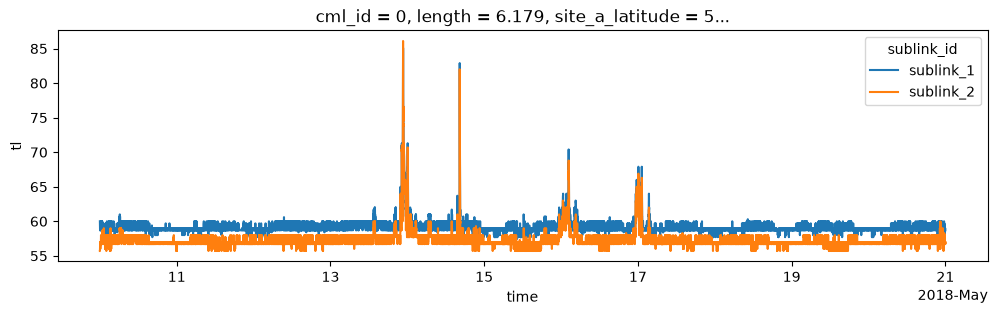
Wet-dry classification
Before estimating rainfall, we need to know which time steps are affected by rain (wet) and which are not (dry).
pycomlink provides several methods for wet-dry classification. Here we do a quick comparison of two methods:
A simple threshold-based method using the rolling standard deviation of the total loss
tl(Schleiss & Berne (2010)) which can be done usingxarray’s rolling window functionality.The “nearby-link approach” from the RAINLINK package (Overeem et al. (2016)) which compares the signal of a given link with the signals of nearby links to determine wet and dry periods.
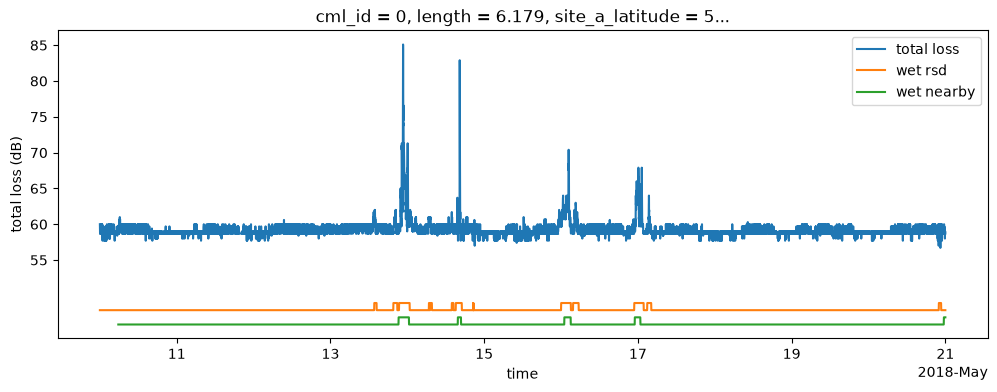
The rolling standard deviation (RSD) of the total loss tl can be easily calculated for all CMLs in parallel using xarray’s rolling window functionality.
We set the threshold to distinguish between wet and dry periods to 0.7 which works well for CMLs that do not have significant noise in their total loss signal.
ds_cmls['wet_rsd'] = ds_cmls['tl'].rolling(time=60, center=True).std() > 0.7The nearby-link approach works with 15-minute min-max data, for which we have to aggregate our initial rsl and tsl data, and a specific preprocessing that is required to be inline with the original implementation.
import pycomlink.processing.wet_dry.nearby_wetdry as nearby_wetdry

# As in the original implementation in RAINLINK we use rsl-tsl
# here instead of the commonly used tl which is tsl - rsl
rstl = ds_cmls.rsl - ds_cmls.tsl
pmin = rstl.resample(time="15min").min()
pmax = rstl.resample(time="15min").max()

# Since the method works by comparing the signals from nearby links,
# we need to calculate the distances between all CML. As in the original
# implementation in RAINLINK, we calculate the distances between all CML endpoints.
ds_dist = nearby_wetdry.calc_distance_between_cml_endpoints(
    cml_ids=ds_cmls.cml_id.values,
    site_a_latitude=ds_cmls.site_a_latitude,
    site_a_longitude=ds_cmls.site_a_longitude,
    site_b_latitude=ds_cmls.site_b_latitude,
    site_b_longitude=ds_cmls.site_b_longitude,
)

# Add mask for links within the specified radius
r = 15 # search radius in km
ds_dist["within_r"] = (
    (ds_dist.a_to_all_a < r)
    & (ds_dist.a_to_all_b < r)
    & (ds_dist.b_to_all_a < r)
    & (ds_dist.b_to_all_b < r)
)

wet_nearby_15min, F = nearby_wetdry.nearby_wetdry(
    pmin=pmin,
    ds_dist=ds_dist,
    radius=r,
    thresh_median_P=-1.4,
    thresh_median_PL=-0.7,
    min_links=3,
    interval=15,
    timeperiod=24,
)

ds_cmls['wet_nearby'] = wet_nearby_15min.reindex_like(ds_cmls.time).ffill(dim='time')
0it [00:00, ?it/s]35it [00:00, 343.36it/s]70it [00:00, 345.64it/s]106it [00:00, 348.27it/s]141it [00:00, 329.73it/s]175it [00:00, 306.72it/s]211it [00:00, 320.36it/s]244it [00:00, 321.68it/s]278it [00:00, 326.87it/s]311it [00:00, 307.11it/s]344it [00:01, 311.70it/s]376it [00:01, 288.77it/s]409it [00:01, 297.77it/s]443it [00:01, 307.02it/s]476it [00:01, 312.73it/s]500it [00:01, 316.10it/s]
0%| | 0/500 [00:00<?, ?it/s] 1%| | 4/500 [00:00<00:13, 36.70it/s] 2%|▏ | 8/500 [00:00<00:13, 37.66it/s] 3%|▎ | 13/500 [00:00<00:11, 42.40it/s] 4%|▍ | 19/500 [00:00<00:10, 48.02it/s] 5%|▍ | 24/500 [00:00<00:09, 47.75it/s] 6%|▋ | 32/500 [00:00<00:08, 57.24it/s] 9%|▉ | 44/500 [00:00<00:06, 74.58it/s] 10%|█ | 52/500 [00:00<00:06, 69.15it/s] 12%|█▏ | 59/500 [00:01<00:07, 59.86it/s] 13%|█▎ | 66/500 [00:01<00:08, 51.61it/s] 14%|█▍ | 72/500 [00:01<00:08, 52.72it/s] 16%|█▌ | 78/500 [00:01<00:08, 50.77it/s] 17%|█▋ | 84/500 [00:01<00:08, 49.35it/s] 18%|█▊ | 90/500 [00:01<00:08, 45.64it/s] 19%|█▉ | 95/500 [00:01<00:09, 43.16it/s] 20%|██ | 100/500 [00:02<00:09, 41.51it/s] 21%|██ | 105/500 [00:02<00:09, 41.85it/s] 22%|██▏ | 110/500 [00:02<00:09, 42.80it/s] 23%|██▎ | 115/500 [00:02<00:08, 43.81it/s] 24%|██▍ | 120/500 [00:02<00:08, 44.42it/s] 25%|██▌ | 125/500 [00:02<00:08, 42.04it/s] 26%|██▌ | 130/500 [00:02<00:08, 43.27it/s] 27%|██▋ | 135/500 [00:02<00:08, 44.29it/s] 28%|██▊ | 140/500 [00:02<00:07, 45.10it/s] 29%|██▉ | 145/500 [00:03<00:07, 45.66it/s] 30%|███ | 151/500 [00:03<00:07, 48.42it/s] 31%|███ | 156/500 [00:03<00:07, 43.54it/s] 32%|███▏ | 161/500 [00:03<00:09, 36.17it/s] 33%|███▎ | 165/500 [00:03<00:10, 32.89it/s] 34%|███▍ | 169/500 [00:03<00:10, 32.37it/s] 35%|███▍ | 173/500 [00:03<00:10, 32.22it/s] 35%|███▌ | 177/500 [00:03<00:09, 33.05it/s] 37%|███▋ | 183/500 [00:04<00:08, 38.58it/s] 38%|███▊ | 188/500 [00:04<00:07, 40.17it/s] 39%|███▊ | 193/500 [00:04<00:07, 40.83it/s] 40%|███▉ | 198/500 [00:04<00:07, 39.79it/s] 41%|████ | 203/500 [00:04<00:07, 39.12it/s] 42%|████▏ | 209/500 [00:04<00:06, 43.05it/s] 43%|████▎ | 214/500 [00:04<00:07, 39.99it/s] 44%|████▍ | 219/500 [00:04<00:06, 40.19it/s] 45%|████▌ | 225/500 [00:05<00:06, 43.20it/s] 46%|████▌ | 231/500 [00:05<00:05, 46.52it/s] 47%|████▋ | 236/500 [00:05<00:05, 46.82it/s] 48%|████▊ | 241/500 [00:05<00:05, 46.96it/s] 49%|████▉ | 246/500 [00:05<00:05, 46.99it/s] 50%|█████ | 251/500 [00:05<00:05, 43.97it/s] 51%|█████ | 256/500 [00:05<00:05, 42.04it/s] 52%|█████▏ | 261/500 [00:05<00:05, 43.31it/s] 53%|█████▎ | 266/500 [00:06<00:05, 41.53it/s] 54%|█████▍ | 271/500 [00:06<00:05, 42.84it/s] 55%|█████▌ | 276/500 [00:06<00:05, 39.94it/s] 56%|█████▋ | 282/500 [00:06<00:05, 43.48it/s] 57%|█████▋ | 287/500 [00:06<00:05, 41.65it/s] 58%|█████▊ | 292/500 [00:06<00:05, 40.85it/s] 59%|█████▉ | 297/500 [00:06<00:05, 40.22it/s] 60%|██████ | 302/500 [00:06<00:05, 39.27it/s] 61%|██████ | 306/500 [00:07<00:04, 39.00it/s] 62%|██████▏ | 310/500 [00:07<00:04, 38.56it/s] 63%|██████▎ | 315/500 [00:07<00:04, 40.64it/s] 64%|██████▍ | 320/500 [00:07<00:04, 39.63it/s] 65%|██████▍ | 324/500 [00:07<00:04, 39.26it/s] 66%|██████▌ | 328/500 [00:07<00:04, 38.82it/s] 66%|██████▋ | 332/500 [00:07<00:04, 38.66it/s] 67%|██████▋ | 336/500 [00:07<00:04, 38.64it/s] 68%|██████▊ | 340/500 [00:07<00:04, 38.18it/s] 69%|██████▉ | 344/500 [00:07<00:04, 38.15it/s] 70%|██████▉ | 348/500 [00:08<00:03, 38.11it/s] 70%|███████ | 352/500 [00:08<00:03, 38.12it/s] 71%|███████ | 356/500 [00:08<00:03, 38.19it/s] 72%|███████▏ | 361/500 [00:08<00:03, 40.83it/s] 73%|███████▎ | 367/500 [00:08<00:02, 45.31it/s] 74%|███████▍ | 372/500 [00:08<00:02, 43.00it/s] 75%|███████▌ | 377/500 [00:08<00:02, 41.46it/s] 76%|███████▋ | 382/500 [00:08<00:02, 40.55it/s] 78%|███████▊ | 389/500 [00:09<00:02, 47.63it/s] 79%|███████▉ | 395/500 [00:09<00:02, 50.29it/s] 80%|████████ | 401/500 [00:09<00:02, 48.55it/s] 81%|████████ | 406/500 [00:09<00:02, 45.19it/s] 82%|████████▏ | 411/500 [00:09<00:02, 43.03it/s] 83%|████████▎ | 416/500 [00:09<00:01, 43.90it/s] 84%|████████▍ | 421/500 [00:09<00:01, 42.29it/s] 85%|████████▌ | 426/500 [00:09<00:01, 41.12it/s] 86%|████████▌ | 431/500 [00:10<00:01, 39.87it/s] 88%|████████▊ | 438/500 [00:10<00:01, 45.36it/s] 89%|████████▊ | 443/500 [00:10<00:01, 43.27it/s] 90%|████████▉ | 448/500 [00:10<00:01, 41.92it/s] 91%|█████████ | 453/500 [00:10<00:01, 40.51it/s] 92%|█████████▏| 458/500 [00:10<00:01, 39.48it/s] 92%|█████████▏| 462/500 [00:10<00:00, 38.99it/s] 93%|█████████▎| 466/500 [00:10<00:00, 39.00it/s] 94%|█████████▍| 470/500 [00:10<00:00, 38.79it/s] 95%|█████████▍| 474/500 [00:11<00:00, 38.59it/s] 96%|█████████▌| 479/500 [00:11<00:00, 41.09it/s] 97%|█████████▋| 484/500 [00:11<00:00, 40.15it/s] 98%|█████████▊| 489/500 [00:11<00:00, 39.26it/s] 99%|█████████▊| 493/500 [00:11<00:00, 39.05it/s]100%|█████████▉| 499/500 [00:11<00:00, 43.99it/s]100%|██████████| 500/500 [00:11<00:00, 42.77it/s]
i_cml = 0

ds_cml = ds_cmls.isel(cml_id=i_cml)

ds_cml.tl.isel(sublink_id=0).plot.line(x='time', figsize=(12, 4), label='total loss')

(ds_cml['wet_rsd'].isel(sublink_id=0) + 48).plot.line(x='time', label='wet rsd')
(ds_cml['wet_nearby'].isel(sublink_id=0) + 46).plot.line(x='time', label='wet nearby')

plt.ylabel('total loss (dB)')
plt.yticks(range(55, 90, 5));
plt.legend();
Baseline determination
The baseline is the dry-weather signal level which we need to derive the rain-induced attenuation by assuming a constant level via the baseline_constant function during rain events.
There is also the baseline_linear function which generates the linear slope between the dry period signal level before and after the rain event. Since we will use a wet antenna estimation method to adjuste the baseline in the next section, we typically only use baseline_constant.
ds_cmls['baseline'] = pycml.processing.baseline.baseline_constant(
    trsl=ds_cmls.tl,
    wet=ds_cmls.wet_rsd,
    n_average_last_dry=5,
)
t_start = '2018-05-13 06:00:00'
t_end = '2018-05-14'
ds_cml = ds_cmls.isel(cml_id=0, sublink_id=0).sel(time=slice(t_start, t_end))
ds_cml.tl.plot.line(x='time', figsize=(12, 3), label='total loss')
ds_cml.baseline.plot.line(x='time', color='r', linestyle=':', zorder=-1, label='baseline')
plt.legend()
plt.ylabel('total loss in dB');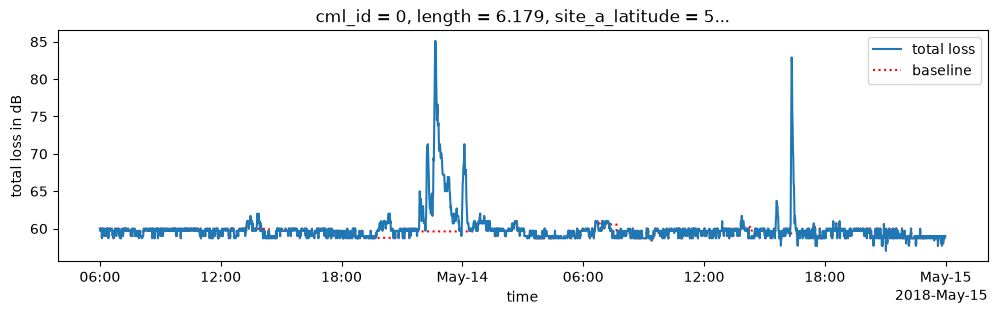
Wet antenna attenuation
Water on the antenna attenuates the signal and adds to the path loss. It thus leadsd to overestimation of rainfall if not corrected. pycomlink provides several models to estimate and correct for the wet antenna attenuation.
Here we show two examples:
A rain-rate dependent model based on Pastorek et al. (2022)
A time-dependent model based on Schleiss et al. (2013)
Note that both methods can be adjusted via several parameters. We use parameters that work well on average here. But WAA can be highly dependent on the antenna radome material and environmental conditions.
ds_cmls['A_obs'] = ds_cmls.tl - ds_cmls.baseline
ds_cmls['A_obs'] = ds_cmls.A_obs.where(ds_cmls.A_obs >=0, 0)

ds_cmls['waa_pastorek'] = pycml.processing.wet_antenna.waa_pastorek_2021_from_A_obs(
    A_obs=ds_cmls.A_obs.transpose('cml_id', 'sublink_id', 'time'),
    f_Hz=ds_cmls.frequency,
    pol=ds_cmls.polarization.data,
    L_km=ds_cmls.length,
    A_max=6,
    zeta=0.7,
    d=0.15,
)

ds_cmls['waa_schleiss'] = pycml.processing.wet_antenna.waa_schleiss_2013(
    rsl=ds_cmls.tl,
    baseline=ds_cmls.baseline,
    wet=ds_cmls.wet_rsd,
    waa_max=2.2,
    delta_t=1,
    tau=15,
)
t_start = '2018-05-13 19:00:00'
t_end = '2018-05-14 01:00:00'
ds_cml = ds_cmls.isel(cml_id=0, sublink_id=0).sel(time=slice(t_start, t_end))
ds_cml.tl.plot.line(x='time', figsize=(12, 3), label='total loss')
ds_cml.baseline.plot.line(x='time', color='k', linestyle=':', zorder=-1, label='baseline')
(ds_cml.baseline + ds_cml.waa_pastorek).plot.line(x='time', color='C1', linestyle='--', zorder=-1, label='baseline + WAA')
(ds_cml.baseline + ds_cml.waa_schleiss).plot.line(x='time', color='C2', linestyle='--', zorder=-1, label='baseline + WAA (Schleiss)')
plt.legend()
plt.ylabel('total loss in dB');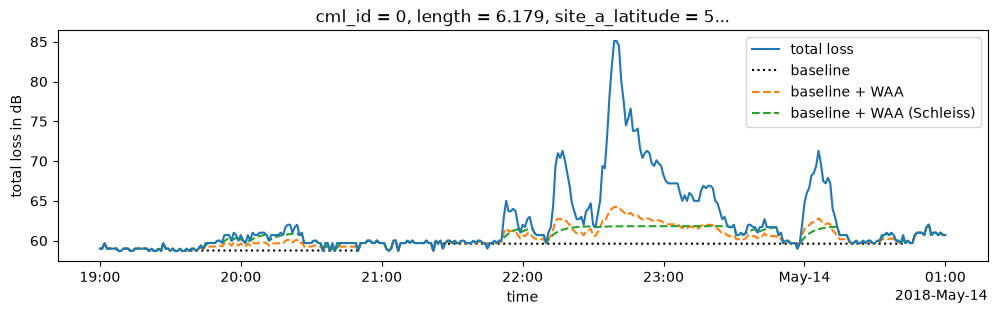
Rainfall estimation via the k-R relation
Finally, we convert the rain-induced attenuation to rain rate using the power-law k-R relation.
ds_cmls['R'] = pycml.processing.k_R_relation.calc_R_from_A(
    A=ds_cmls.tl - ds_cmls.baseline - ds_cmls.waa_pastorek,
    L_km=ds_cmls.length,
    f_GHz=ds_cmls.frequency / 1e9,
    pol=ds_cmls.polarization,
)
ds_cmls.R.isel(cml_id=0, sublink_id=0).plot(figsize=(12, 3));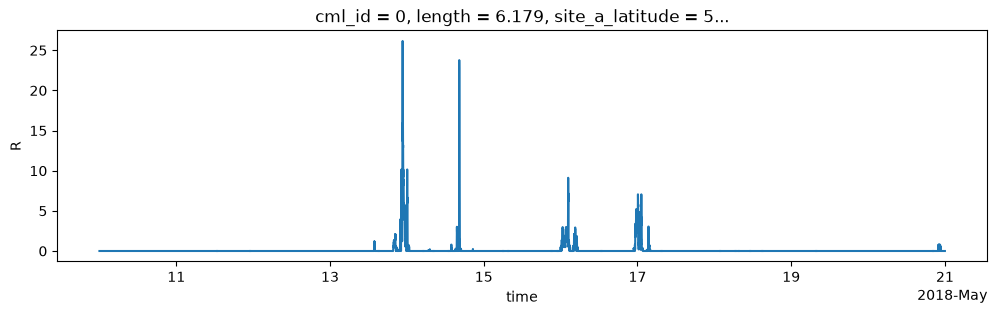
- Graf, M., Chwala, C., Polz, J., & Kunstmann, H. (2020). Rainfall estimation from a German-wide commercial microwave link network: optimized processing and validation for 1 year of data. Hydrology and Earth System Sciences, 24(6), 2931–2950. 10.5194/hess-24-2931-2020
- Schleiss, M., & Berne, A. (2010). Identification of Dry and Rainy Periods Using Telecommunication Microwave Links. IEEE Geoscience and Remote Sensing Letters, 7(3), 611–615. 10.1109/lgrs.2010.2043052
- Overeem, A., Leijnse, H., & Uijlenhoet, R. (2016). Retrieval algorithm for rainfall mapping from microwave links in a cellular communication network. Atmospheric Measurement Techniques, 9(5), 2425–2444. 10.5194/amt-9-2425-2016
- Pastorek, J., Fencl, M., Rieckermann, J., & Bares, V. (2022). Precipitation Estimates From Commercial Microwave Links: Practical Approaches to Wet-Antenna Correction. IEEE Transactions on Geoscience and Remote Sensing, 60, 1–9. 10.1109/tgrs.2021.3110004
- Schleiss, M., Rieckermann, J., & Berne, A. (2013). Quantification and Modeling of Wet-Antenna Attenuation for Commercial Microwave Links. IEEE Geoscience and Remote Sensing Letters, 10(5), 1195–1199. 10.1109/lgrs.2012.2236074